
Kia Picanto (JA): Floor Console / Rear Console Cover
Components and components location
| Component Location |
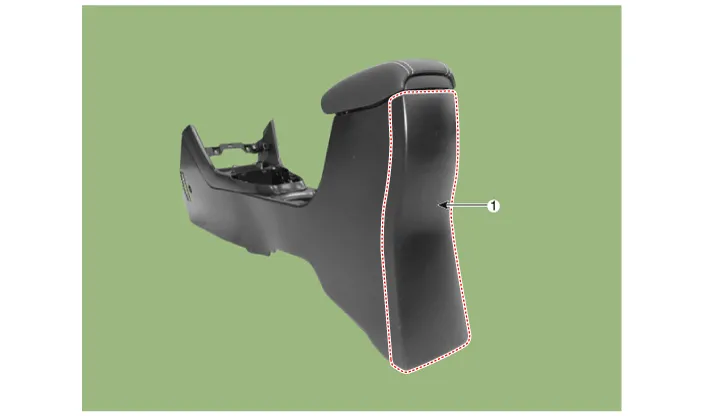
| 1. Rear console cover |
Repair procedures
| Replacement |
Put on gloves to protect your hands. |

|

| 1. | Remove the floor console assembly.
(Refer to Floor Console - "Floor Console Assembly")
|
| 2. | Loosen the screws.
|
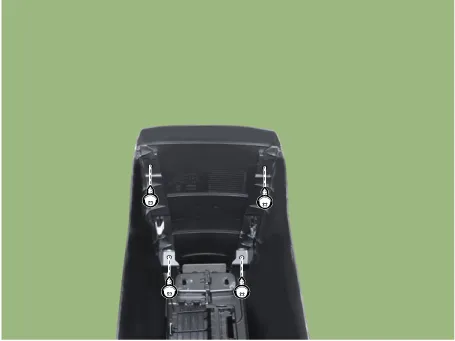
| 3. | Remove the rear console cover (A) by using a remover.
|
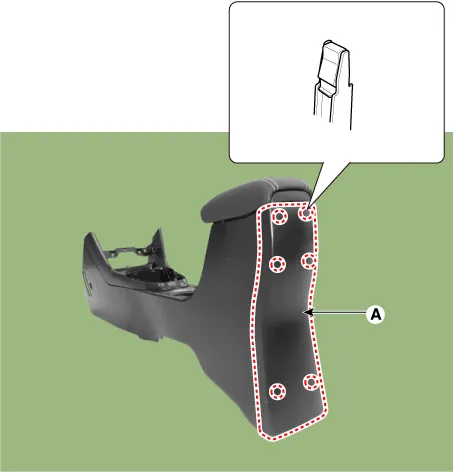
| 4. | Install in the reverse order of removal.
|
Components and components location Component Location 1. Floor console assembly Repair procedures Replacement Put on gloves to protect your hands.
Components and components location Component Location 1. Console armrest Repair procedures Replacement Put on gloves to protect your hands.
Other information:
Kia Picanto (JA) 2017-2026 Service & Repair Manual: License Lamps
Repair procedures Removal 1. Disconnect the negative (-) battery terminal. 2. Remove the license lamp assembly (A) after pressing the locking pin. 3. Disconnect the license lamp connector (A). 4. Remove the license lamp bulb (B) after removing the license lamp socket (A).
Kia Picanto (JA) 2017-2026 Service & Repair Manual: Power Window Switch
Components and components location Components Driver Power Window Switch Connector Pin Information [All Manual / Auto Down Type] (LHD) No. Description No.
Categories
- Manuals Home
- Kia Picanto Owners Manual
- Kia Picanto Service Manual
- Engine Oil and Filter
- Cooling System
- Body Control Module (BCM)
- New on site
- Most important about car
