
Kia Picanto (JA): Smart Key System / Smart Key Unit
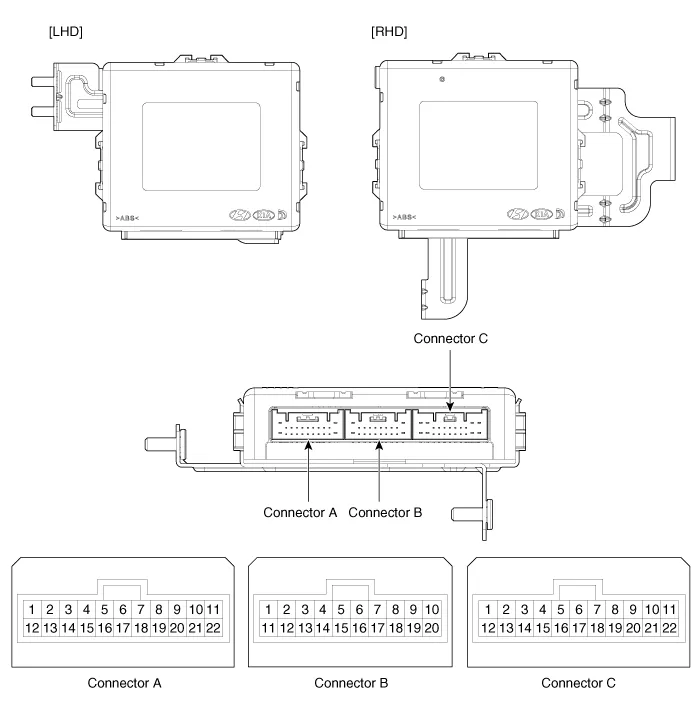
Components and components location
| Components |
|
No.
|
Connector A
|
Connector B
|
Connector C
|
| 1 | - | IGN2 Relay_output | Battery (+)_Signal |
| 2 | SSB Switch1 signal_input | P-CAN (Low) | - |
| 3 | Driver door outside handle switch_input | P-CAN (High) | Immobilizer antenna (Power)_output |
| 4 | - | C-CAN (High) | Driver outside handle antenna (Power)_output |
| 5 | - | C-CAN (Low) | Passenger outside handle antenna (Power)_output |
| 6 | - | SSB Amber illumination_output | Bumper antenna (Power)_output |
| 7 | RPM Signal_input | - | Interior antenna 1 (Power)_output |
| 8 | Start signal feedback_input | SSB Illumination (+)_output | Interior antenna 2 (Power)_output |
| 9 | IGN2 | ESCL Enable_output | - |
| 10 | - | Battery (+)_Power | - |
| 11 | Starter relay_output | IGN1 Relay_output | - |
| 12 | Ground_Power1 | ESCL (COM) | - |
| 13 | SSB Switch2 signal_input | EMS (COM) | ESCL_Ground (-)_output |
| 14 | Assist door outside handle switch_input | - | Immobilizer antenna (Ground)_output |
| 15 | - | SSB Illumination (-)_output | Driver outside handle antenna (Ground)_output |
| 16 | AT : "P" Positon_input MT : Clutch switch_input | SSB Illumination (Blue)_output SSB Illumination (Red)_output | Passenger outside handle antenna (Ground)_output |
| 17 | ESCL Unlock switch_input | - | Bumper antenna (Ground)_output |
| 18 | Wheel speed sensor_input | Exterior buzzer_output | Interior antenna 1 (Ground)_output |
| 19 | ACC Signal_input | - | Interior antenna 2 (Ground)_output |
| 20 | IGN1 | ESCL (+)_output | - |
| 21 | Brake switch_input | - | |
| 22 | ACC Relay_output | Ground_Power2 |
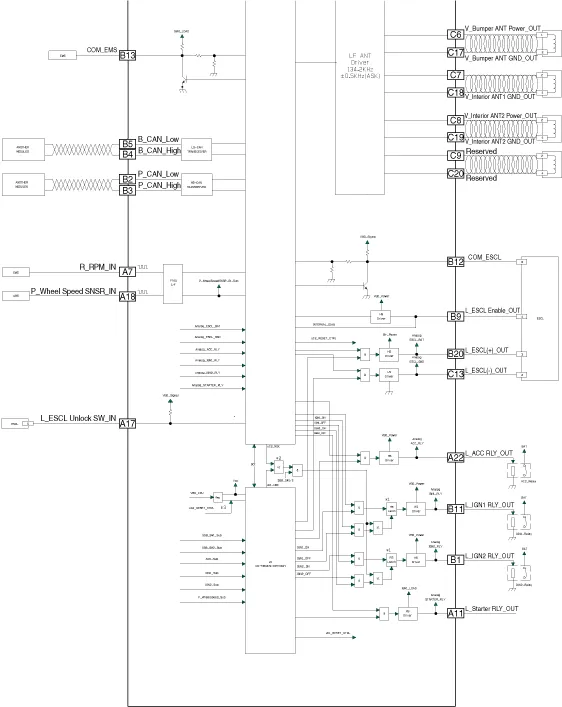
Schematic diagrams
| Circuit Diagram |

Repair procedures
| Removal |
Put on gloves to prevent hand injuries. |

|

| 1. | Disconnect the negative (-) battery terminal. |
| 2. | Remove the glove box.
(Refer to Body - "Glove Box")
|
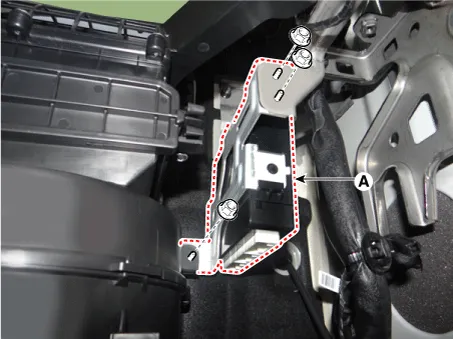
| 3. | Disconnect the smart key unit connectors (A).
|

| 4. | Remove the smart key unit (A) after loosening the mounting nuts.
|
| 1. | Disconnect the negative (-) battery terminal. |
| 2. | Remove the floor console assembly.
(Refer to Body - "Floor Console Assembly")
|
| 3. | Remove the interior 1 antenna (A) after loosening the mounting bolt and nut and disconnecting the connector.
|

| 1. | Disconnect the negative (-) battery terminal. |
| 2. | Remove the rear seat cushion assembly.
(Refer to Body - "Rear Seat Assembly")
|
| 3. | Remove the interior 2 antenna (A) after loosening the mounting nuts and disconnecting the connector.
|

| 1. | Disconnect the negative (-) battery terminal. |
| 2. | Remove the rear bumper assembly.
(Refer to Body - "Rear Bumper Assembly")
|
| 3. | Remove the rear bumper antenna (A) after loosening the mounting screws and disconnecting the connector.
|

| 1. | Disconnect the negative (-) battery terminal. |
| 2. | Remove the left front wheel guard.
(Refer to Body - "Front Wheel Guard")
|
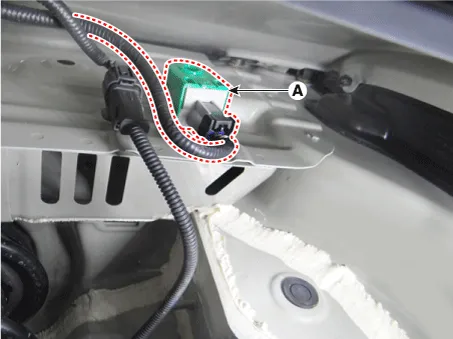
| 3. | Remove the buzzer (A) after disconnecting the connector.
|
| 1. | Disconnect the negative (-) battery terminal. |
| 2. | Remove the front door outside handle.
(Refer to Body - "Front Door Outside Handle")
|

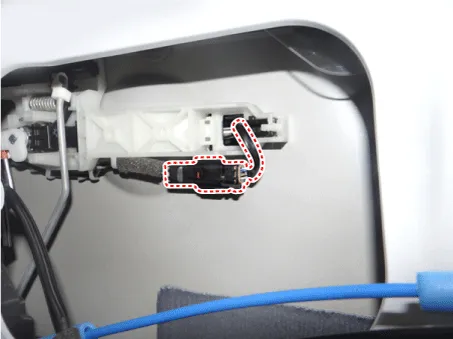
| 1. | Disconnect the negative (-) battery terminal. |
| 2. | Remove the tailgate trim.
(Refer to Body - "Tailgate Trim")
|
| 3. | Disconnect the tailgate outside handle assembly connector (A).
|
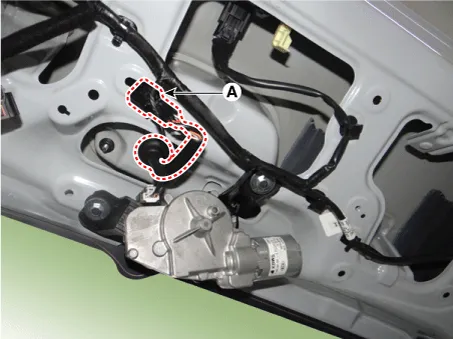
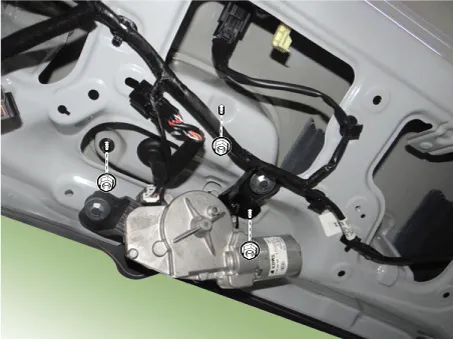
| 4. | Remove the tailgate outside handle assembly (A) after loosening the mounting nuts.
|

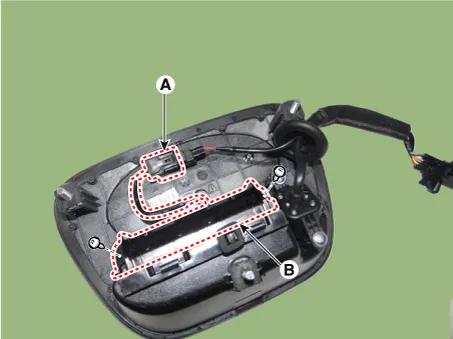
| 5. | Disconnect the tailgate open switch connector (A). |
| 6. | Remove the tailgate open switch (B) after loosening the mounting screws.
|
| Inspection |
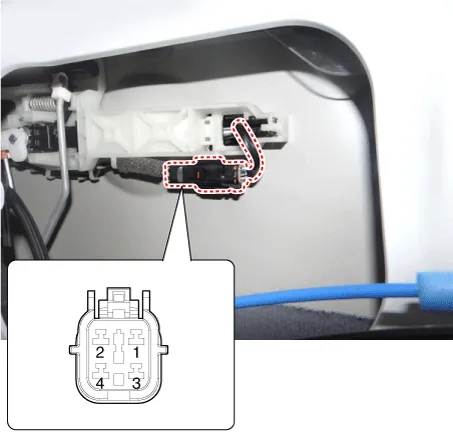
| 1. | Disconnect the front door outside handle connector (A).
|

| 2. | Check for continuity between terminals No 2 and No 4.
|
| 1. | Check for continuity between the tailgate open switch terminals.
|
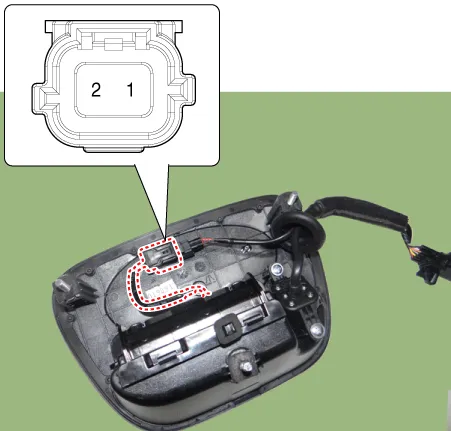
| 2. | If continuity is not specified, inspect the switch
|

| Installation |
| 1. | Install the smart key unit after connecting the connectors. |
| 2. | Install the glove box. |
| 3. | Connect the negative (-) battery terminal and check the smart key system. |
| 1. | Install the interior 1 antenna. |
| 2. | Install the floor console assembly. |
| 3. | Connect the negative (-) battery terminal and check the smart key system. |
| 1. | Install the interior 2 antenna. |
| 2. | Install the rear seat cushion assembly. |
| 3. | Connect the negative (-) battery terminal and check the smart key system. |
| 1. | Install the rear bumper antenna. |
| 2. | Install the rear bumper assembly. |
| 3. | Connect the negative (-) battery terminal and check the smart key system. |
| 1. | Install the buzzer. |
| 2. | Install the left front wheel guard. |
| 3. | Connect the negative (-) battery terminal and check the smart key system. |
| 1. | Install the front door outside handle. |
| 2. | Connect the negative (-) battery terminal and check the smart key system. |
| 1. | Install the tailgate open switch after connecting the connector. |
| 2. | Install the tailgate outside handle assembly. |
| 3. | Connect the tailgate outside handle assembly connector. |
| 4. | Install the tailgate trim. |
| 5. | Connect the negative (-) battery terminal and check the smart key system. |
Repair procedures Smart Key Smart Key Code Saving 1. Connect the DLC cable of KDS/GDS to the data link connector (16 pins) in driver side crash pad lower panel, turn the power on KDS/GDS.
Repair procedures Inspection Self Diagnosis With Scan Tool It will be able to diagnose defects of SMART KEY system with KDS/GDS quickly. KDS/GDS can operates actuator forcefully, input/output value monitoring and self diagnosis.
Other information:
Kia Picanto (JA) 2017-2026 Service & Repair Manual: AVN Antenna
Components and components location Components [Roof Antenna (Radio+GPS/GNSS+DAB+GSM)] Repair procedures Removal Roof antenna 1.Disconnect the negative (-) battery terminal. 2.Remove the roof trim assembly. (Refer to Body - "Roof Trim Assembly") 3.
Kia Picanto (JA) 2017-2026 Service & Repair Manual: Button Engine Start System
Components and components location Component Location 1. Body control module (BCM) 2. Smart key unit (SMK) 3. Interior antenna 1 4. Interior antenna 2 5. FOB key 6. Start Stop Button (SSB) 7. Door handle & door antenna 8. Bumper antenna 9.
Categories
- Manuals Home
- Kia Picanto Owners Manual
- Kia Picanto Service Manual
- Cylinder Head
- Engine Control / Fuel System
- Coolant
- New on site
- Most important about car
