
Kia Picanto (JA): Clutch System / Ignition Lock Switch
Specifications
| Specifications |
|
Item
|
Specifications
|
| Working voltage | DC 12.5V |
| Operating force | Initial position : 0.25 ± 0.15 N(0.025 ± 0.015 kg, 0.056 ± 0.034 lb) |
| Full position : 0.8 ± 0.2 N(0.08 ± 0.02 kgf, 0.579 ± 0.014 lb-ft) | |
| Working temperature | -40°C to 80°C (-40°F to 176°F) |
Description and operation
| Description |
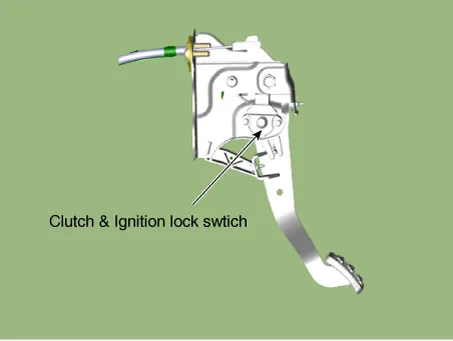
| – | Ignition lock switch is mounted on the clutch pedal. |
| – | Ignition lock switch is operated when you press the clutch pedal. |
| – | If the clutch pedal is not pressed down, the engine is not started. |
Repair procedures
| Inspection |
| 1. | Remove the clutch & ignition lock switch. |
| 2. | Rotate the switch lever to the direction of the arrow to check the operating point (A).
|


| Removal |
| 1. | Turn ignition switch OFF and disconnect the negative (-) battery cable. |
| 2. | Remove the crash pad lower panel.
(Refer to Body - "Crash Pad Lower Panel")
|
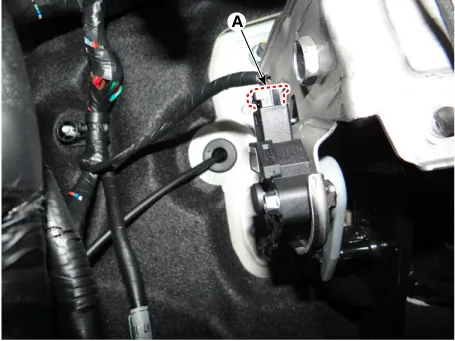
| 3. | Disconnect the cluch switch & ignition lock swtich connector (A).
|
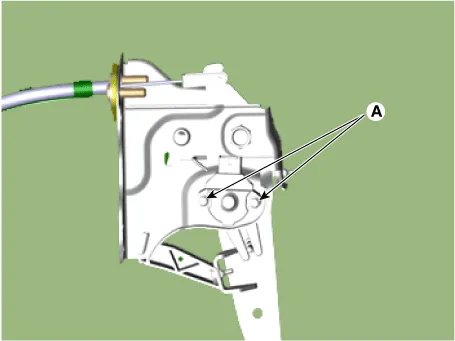
| 4. | Loosen the bolts (A) and then remove the ignition lock switch & clutch switch.
|
| Installation |
| 1. | Install in the reverse order of removal.
|


Components and components location Components [Kappa 1.0 MPI / FFV, Kappa 1.2 MPI] 1. Clutch disc assembly 2. Clutch cover assembly 3. Clutch release bearing 4.
Specifications Specifications Item Specifications Working voltage DC 12.5V Operating force Initial position : 0.
Other information:
Kia Picanto (JA) 2017-2026 Service & Repair Manual: Immobilizer System
Schematic diagrams Circuit Diaram Description and operation Description The immobilizer system will disable the vehicle unless the proper ignition key is used, in addition to the currently available anti-theft systems such as car alarms, the immobilizer system aims to drastically reduce the rate of auto theft.
Kia Picanto (JA) 2017-2026 Service & Repair Manual: Seat Heater
Components and components location Component Location 1. Seat heater unit 2. Front seat back heater 3. Front seat cushion heater Schematic diagrams Circuit Diagram Repair procedures Inspection 1.Check for continuity and measure the resistance between terminals No 1 and No 4.
Categories
- Manuals Home
- Kia Picanto Owners Manual
- Kia Picanto Service Manual
- Engine And Transaxle Assembly
- Thermostat
- Cooling System
- New on site
- Most important about car
