
Kia Picanto (JA): Cruise Control System / Cruise Control Switch
Components and components location
| Components |
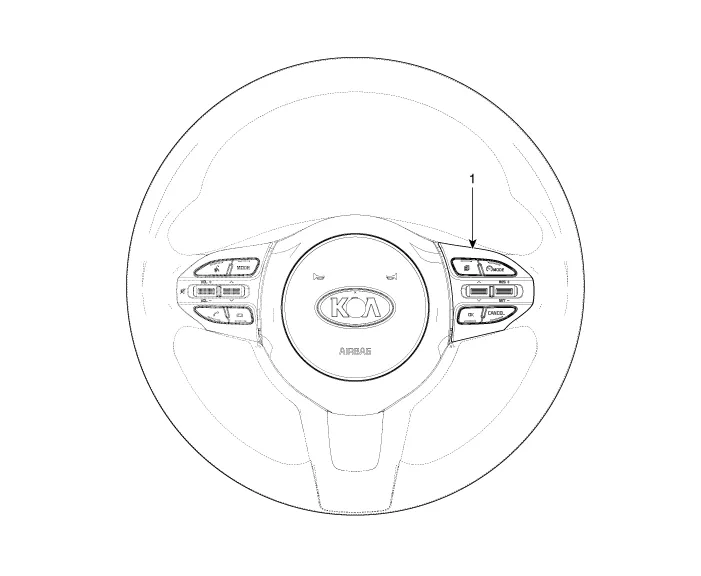
| 1. Right Remote Control Switch (Cruise+Trip Computer) |
Schematic diagrams
| Circuit Diagram |

| [Trip (2 Button) + SEG LCD Cluster] |

| [Trip (2 Button) + ACC + Cruise] |

| [Trip (2 Button) + ACC + Cruise + SLD] |

| [Trip (4 Button) + DOT&TFT LCD Cluster] |

| [Trip (4 Button) + ACC + Cruise] |
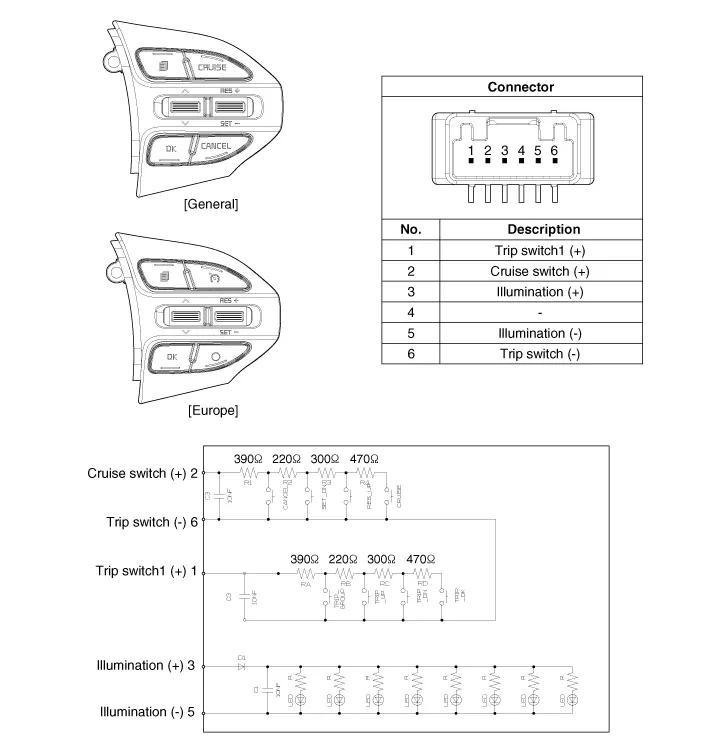
| [Trip (4 Button) + ACC + Cruise + SLD] |

Repair procedures
| Removal |
| 1. | Disconnect the negative (-) battery terminal. |
| 2. | Remove the steering wheel assembly.
(Refer to Steering System - "Steering Wheel")
|
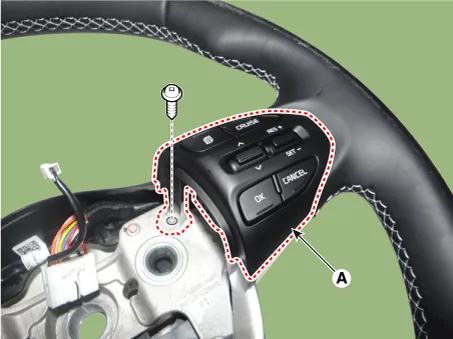
| 3. | Remove the steering wheel remote control (A) after loosening the mounting screws.
|

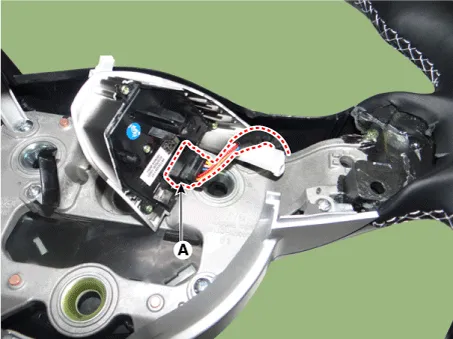
| 4. | Disconnect the steering wheel remote control connector (A).
|
| Installation |
| 1. | Connect the steering wheel remote control connector. |
| 2. | Install the steering wheel remote control. |
| 3. | Install the steering wheel and driver airbag module. |
| 4. | Connect the negative (-) battery terminal. |
| Inspection |
| 1. | Check for resistance between terminals in each switch position.
[RH : Cruise + Trip]
|

Description and operation Description The cruise control system is engaged by the cruise "ON/OFF" main switch located on right of steering wheel column.
Specifications Specifications Purge Control Solenoid Valve (PCSV) ▷ Specification Item Specification Coil Resistance (Ω) 18.
Other information:
Kia Picanto (JA) 2017-2026 Service & Repair Manual: Emergency Call (eCall) Unit
Components and components location Component The eCall unit for AVN is equipped in AVN head unit. Repair procedures Removal Carry out the Test Mode in the following cases.– Replacing the eCall unit– Replacing the Bac
Kia Picanto (JA) 2017-2026 Service & Repair Manual: Smart Key Diagnostic
Repair procedures Inspection Self Diagnosis With Scan Tool It will be able to diagnose defects of SMART KEY system with KDS/GDS quickly. KDS/GDS can operates actuator forcefully, input/output value monitoring and self diagnosis. The following three features will be major problem in SMART KEY system.
Categories
- Manuals Home
- Kia Picanto Owners Manual
- Kia Picanto Service Manual
- Suspension System
- Brake System
- Thermostat
- New on site
- Most important about car
