
Kia Picanto (JA): Clutch System / Clutch Master Cylinder
Components and components location
| Components |

| 1. Clutch pedal assembly 2. Ignition lock and clutch switch 3. Master cylinder | 4. Clutch regulator 5. Clutch tube |
Repair procedures
| Removal |
| 1. | Turn ignition switch OFF and disconnect the negative (-) battery cable. |
| 2. | Remove the crash pad lower panel.
(Refer to Body - "Crash Pad Lower Panel")
|
| 3. | Disconnect the ignition lock & clutch switch connector.
|
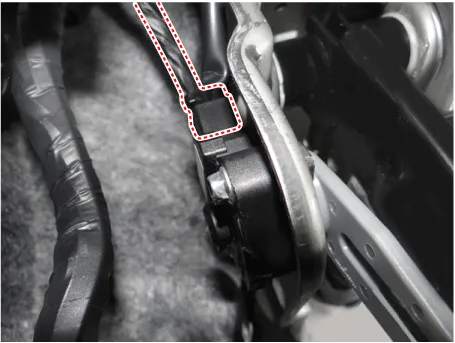
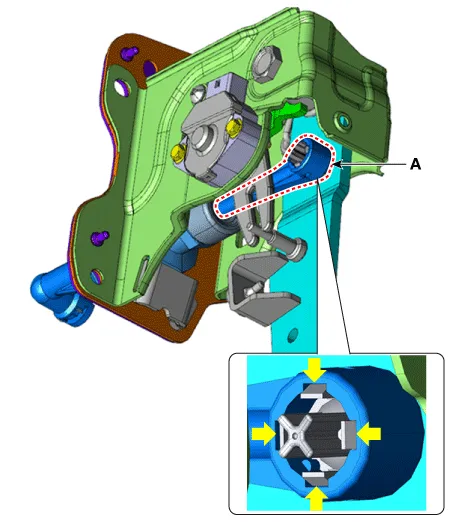
| 4. | Remove the push rod end (A) from the clutch pedal.
|
| 5. | Remove the battery.
G 1.0 T-GDI KAPPA (Refer to Engine Electrical System - "Battery")
|
| 6. | Remove the ECM.
G 1.0 T-GDI KAPPA (Refer to Engine Control / Fuel System - Engine Control Module (ECM)")
|
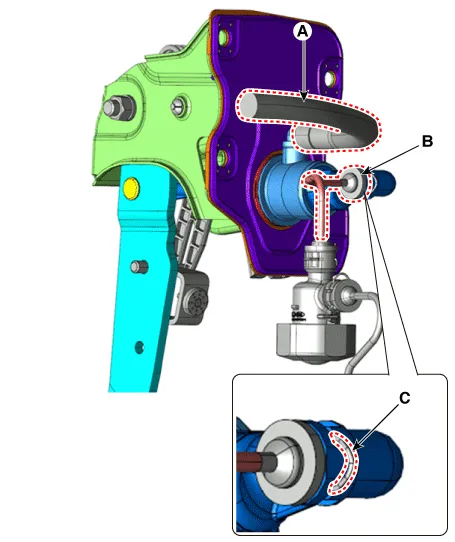
| 7. | Disconnect the reservoir hose (A) and clutch tube (B) from the clutch master cylinder after removeing the pin (C).
|

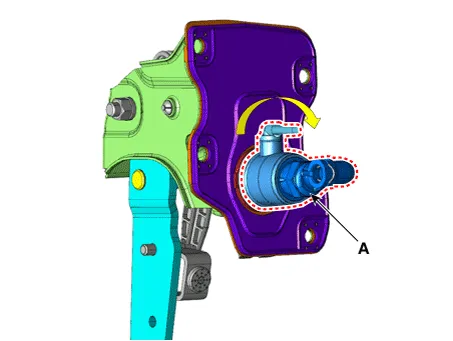
| 8. | Remove the clutch master cylinder (A) by turning it clockwise.
|
| Installation |
| 1. | Install in the reverse order of removal. |
| 2. | After be equipped, perform bleeding air procedure in clutch release cylinder after pouring the brake fluid.
(Refer to Clutch Release Cylinder - "Adjustment")
|
Components and components location Components [Kappa 1.0 MPI / FFV, Kappa 1.2 MPI] 1. Clutch pedal assembly 2. Clutch cable Repair procedures Removal 1.
Components and components location Components [Kappa 1.0 T-GDI] 1. Clutch pedal assembly 2. Ignition lock and clutch switch 3. Master cylinder 4.
Other information:
Kia Picanto (JA) 2017-2026 Service & Repair Manual: Antenna Coil
Repair procedures Removal 1.Disconnect the negative (-) battery terminal. 2.Remove the crash pad lower panel. (Refer to Body - "Crash Pad Lower Panel") 3.Remove the steering column upper and lower shroud panel. (Refer to Body - "Steering Column Shroud Panel") 4.
Kia Picanto (JA) 2017-2026 Service & Repair Manual: Multifunction Switch
Specifications Specifications Items Specifications Rated voltage DC 12 V Operating temperature range -22 - 176°F (-30 - 80°C) Rated load Washer Washer : 6A (Motor load) Components and components location Component 1 .
Categories
- Manuals Home
- Kia Picanto Owners Manual
- Kia Picanto Service Manual
- Engine And Transaxle Assembly
- Thermostat
- Brake System
- New on site
- Most important about car
