
Kia Picanto (JA): Audio / Multimedia Jack
Schematic diagrams
| Circuit Diagram |

Description and operation
| Description |

Repair procedures
| Removal |
Put on gloves to protect your hands. |

|

| 1. | Disconnect the negative (-) battery terminal. |
| 2. | Using a screwdriver or remover, remove the floor console front bezel (A).
|

| 3. | Disconnect the connectors (A) from floor console front bezel.
|
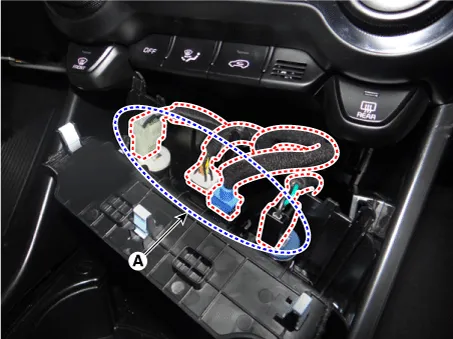
| 4. | Remove the multimedia jack (A) after releasing the fixed hooks.
|


| Installation |
| 1. | Install the multimedia jack. |
| 2. | Connect the connectors from the floor console front bezel. |
| 3. | Install the floor console front bezel. |
| 4. | Connect the negative (-) battery terminal.
|
Components and components location Components 1. Left Remote Control Switch (Audio + Hands free + Voice) 2. Right Remote Control Switch (Cruise+Trip Computer) Schematic diagrams Circuit Diagram [Audio] [Audio + Bluetooth] [Audio + Bluetooth + Voice] [Trip (2 Button) + SEG LCD Cluster] [Trip (2 Button) + ACC + Cruise] [Trip (2 Button) + ACC + Cruise + SLD] [Trip (4 Button) + DOT&TFT LCD Cluster] [Trip (4 Button) + ACC + Cruise] [Trip (4 Button) + ACC + Cruise + SLD] Repair procedures Removal 1.
Specifications Specifications Items Specifications Rated voltage 5V Load Max. 1mA (Relay load) Illuminations (LUX) 50 1.
Other information:
Kia Picanto (JA) 2017-2026 Service & Repair Manual: Emergency Call System
Components and components location Components 1. Head unit (AVN, Audio) 2. Emergency call system button 3. Emergency call system MIC 4. Roof antenna 5. Emergency call unit 6. Supplemental Restraint System Control Module (SRSCM) 7. Emergency call crash pad antenna 8.
Kia Picanto (JA) 2017-2026 Service & Repair Manual: Rear Parking Assist System
Specifications Specification Item Specification Ultrasonic sensor Voltage rating DC 12V Detecting range 11.8 - 39.3 in (30 - 100 cm) Operation voltage DC 9 - 16 V Operation current 60mA Max.
Categories
- Manuals Home
- Kia Picanto Owners Manual
- Kia Picanto Service Manual
- Cylinder Head
- Body Electrical System
- Engine And Transaxle Assembly
- New on site
- Most important about car
