
Kia Picanto (JA): Heater / Mode Control Actuator
Components and components location
| Component Location |
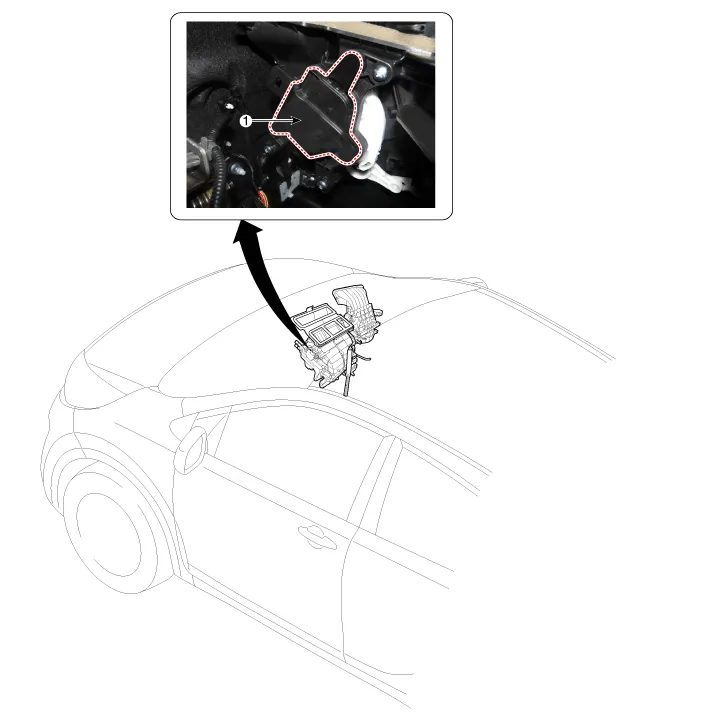
| 1. Mode Control Actuator |
Description and operation
| Description |
Repair procedures
| Inspection |
| 1. | Ignition "OFF” |
| 2. | Disconnect the connector of mode control actuator. |
| 3. | 3.
Verify that the mode control actuator operates to the defrost mode when
connecting 12V to the terminal 3and grounding terminal 4. |
| 4. | Verify that the mode control actuator operates to the vent mode when connecting in the reverse.
|

| 5. | Check the voltage between terminals 6 and 7.
It will feedback current position of actuator to controls. |
| 6. | If the measured voltage is not specification, substitute with a known-good mode control actuator and check for proper operation. |
| 7. | If the problem is corrected, replace the mode control actuator. |
| Replacement |
| 1. | Disconnect the negative (-) battery terminal. |
| 2. | Remove the main crash pad assembly.
(Refer to Body - "Main Crash Pad Assembly")
|
| 3. | Disconnect the connector (A) and then remove the mode control actuator (B) after loosening the mounting screws
|
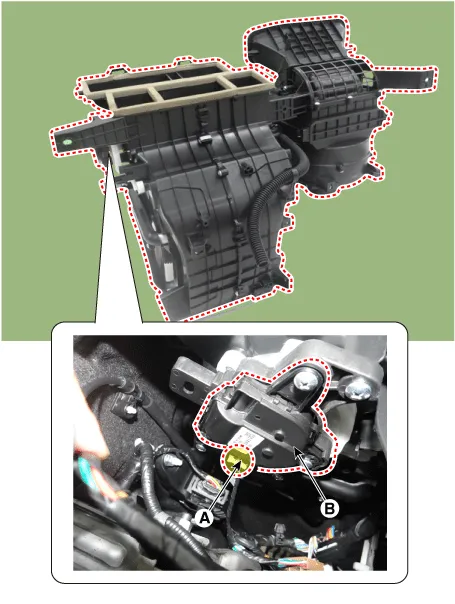
| 4. | Install in the reverse order of removal. |
Components and components location Component Location 1. Temerature Control Actuator Description and operation Description 1.
Repair procedures Replacement 1.Disconnect the negative (-) battery terminal. 2.Remove the heater unit. (Refer to Heater - "Heater Unit") 3.
Other information:
Kia Picanto (JA) 2017-2026 Service & Repair Manual: Emergency Call (eCall) Button
Components and components location Component Repair procedures Removal 1. Disconnect the negative (-) battery terminal. 2. Using a screwdriver or remover, separate the map lamp lens (A) from the map lamp. 3. Remove the map lamp (A) after loosening the screws.
Kia Picanto (JA) 2017-2026 Service & Repair Manual: Ignition Switch Assembly
Repair procedures Inspection 1.Disconnect the key warning switch connector (A) and ignition switch connector (B) from the steering column. 2.Check for continuity between the terminals. 3.If continuity is not specified, replace the switch.
Categories
- Manuals Home
- Kia Picanto Owners Manual
- Kia Picanto Service Manual
- Body Electrical System
- Brake System
- Clutch Cable
- New on site
- Most important about car
