
Kia Picanto (JA): Lighting / Lighting control
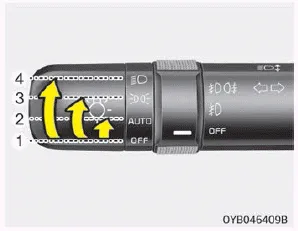
The light switch has a Headlight and a Parking light position.
To operate the lights, turn the knob at the end of the control lever to one of the following positions:
1. Off position
2. Auto light position (if equipped)
3. Parking light position
4. Headlight position
Parking light position

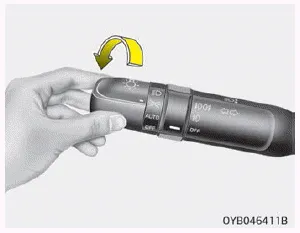
When the light switch is in the parking light position (3rd position), the tail position, license and instrument panel lights will turn ON.
Headlight position

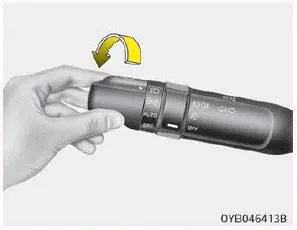
When the light switch is in the headlight position (4th position), the head, tail, position, license and instrument panel lights are ON.
NOTICE
The ignition switch must be in the ON position to turn on the headlights.
Auto light position
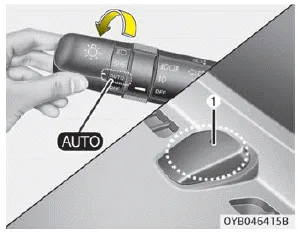
When the light switch is in the AUTO light position, the taillights and headlights will be turned ON or OFF automatically depending on the amount of light outside the vehicle.
CAUTION
- Never place anything over sensor (1) located on the instrument panel, this will ensure better autolight system control.
- Don’t clean the sensor using a window cleaner, the cleanser may leave a light film which could interfere with sensor operation.
- If your vehicle has window tint or other types of metallic coating on the front windshield, the Auto light system may not work properly.
When the headlight switch is in the ON or AUTO position and all doors (and tailgate) are closed and locked, if you press the door unlock button on the transmitter (or smart key), the headlights will come on for about 15 seconds.
To turn on the high beam headlights, push the lever away from you when the headlight is on. Pull it back for low beams. The high beam indicator will light when the headlight high beams are switched on.
Other information:
Kia Picanto (JA) 2017-2026 Service & Repair Manual: Power Window Switch
Components and components location Components Driver Power Window Switch Connector Pin Information [All Manual / Auto Down Type] (LHD) No. Description No.
Kia Picanto (JA) 2017-2026 Service & Repair Manual: Smart Key System
Specifications Specifications Smart Key Unit Items Specification Rated voltage DC 12 V Operating voltage DC 9 - 16 V Operating temperature -31 - 167°F (-35 - 75°C) Load Max. 4mA (When welcome light function "OFF") RF Receiver Items
Categories
- Manuals Home
- Kia Picanto Owners Manual
- Kia Picanto Service Manual
- Front Disc Brake
- Engine Control / Fuel System
- Clutch Cable
- New on site
- Most important about car
