
Kia Picanto (JA): Lighting / High beam operation
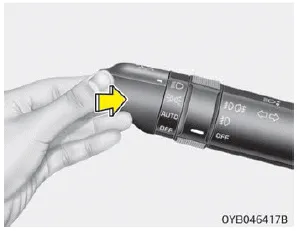
To turn on the high beam headlights, push the lever away from you when the headlight is on. Pull it back for low beams.
The high beam indicator will light when the headlight high beams are switched on. To prevent the battery from being discharged, do not leave the lights on for a prolonged time while the engine is not running.
WARNING
Do not use high beam when there are other vehicles. Using high beam could obstruct the other driver's vision.
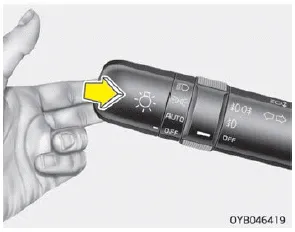
To flash the headlights, pull the lever towards you. It will return to the normal (low beam) position when released. The headlight switch does not need to be on to use this flashing feature.
The light switch has a Headlight and a Parking light position. To operate the lights, turn the knob at the end of the control lever to one of the following positions: 1.
The ignition switch must be on for the turn signals to function. To turn on the turn signals, move the lever up or down (A). The green arrow indicators on the instrument panel indicate which turn signal is operating.
Other information:
Kia Picanto (JA) 2017-2026 Service & Repair Manual: Rear Washer Switch
Repair procedures Inspection Multifunction Switch Inspection 1. Check for continuity between the terminals in each switch position as shown below. Rear Wiper & Washer Switch[LHD] [RHD] Inspection (With KDS/GDS) 1. In the body electrical system, failure can be quickly diagnosed by using the vehicle diagnostic system (KDS/GDS).
Kia Picanto (JA) 2017-2026 Service & Repair Manual: Heating,Ventilation, Air Conditioning
Specifications Specification Air conditioner Item Specification Compressor Type 5VSe09(Variable Dispacement Swashplate) 5VS09 Oil type & Capacity FD46XG(PAG) 100±10g Pulley type POLY V RIBBED BEIT 6PK Displacement 90cc/rev Condenser Heat rejection 9,890 -3% kcal/h
Categories
- Manuals Home
- Kia Picanto Owners Manual
- Kia Picanto Service Manual
- Timing Chain
- Body Control Module (BCM)
- Charging System
- New on site
- Most important about car
