
Kia Picanto (JA): ESC (Electronic Stability Control) System / Emergency Signal System
Description and operation
| Description |
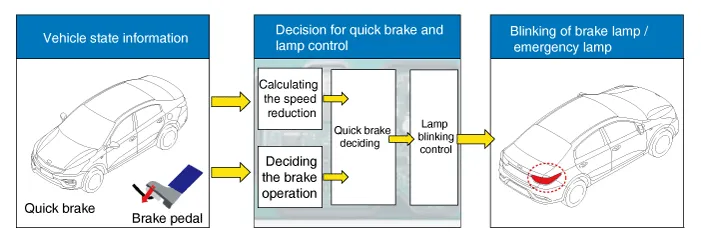
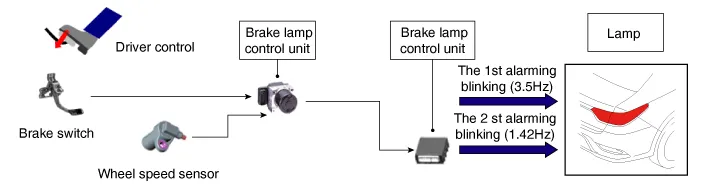
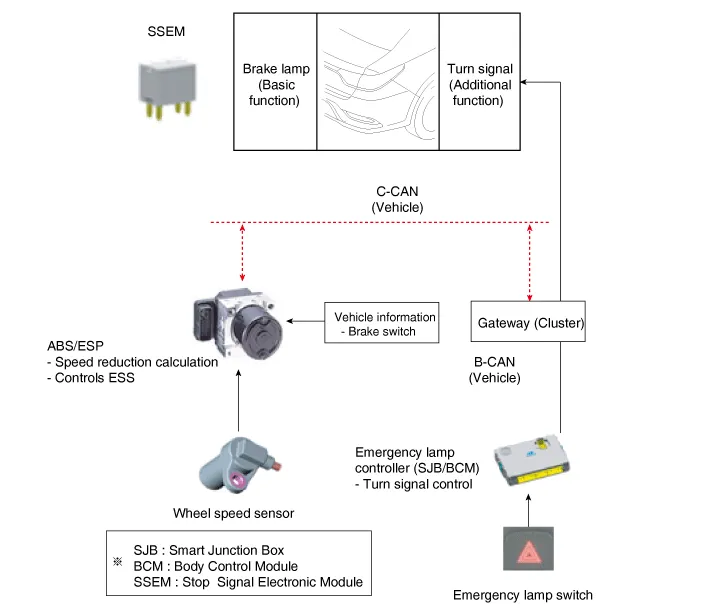
| 1. | Basic function (Blinking the brake lamp/emergency lamp)
|
| 2. | Additional function (Blinking the turn signal)
|

Repair procedures
| Inspection |
| – | The ON/OFF for AEB is included in the USM (User Setting Menu) and the default is ON. |
| – | While IGN is On, it stays at ON, however, the driver's settings do not last next time when IGN is newly On. |
| – | When ESC is Off, AEB is also turned Off. |
| Removal |
| 1. | Turn ignition OFF and disconnect the negative (-) battery cable. |
| 2. | Remove the front bumper cover.
(Refer to Body - "Front Bumper Cover")
|
| 3. | Loosen the AEB unit bolts and then remove the AEB unit. |
| Installation |
| 1. | Installation is the reverse of removal. |
| 2. | Perform AEB variant coding |
| 3. | Perform the AEB radar alignment. |
Description and operation Description 1. The ESC OFF switch is for the user to turn off the ESC system. 2. The ESC OFF lamp is on when ESC OFF switch is engaged.
Description and operation Description – AEB system is designed to help avoid a potential collision or reduce its impact when drivers applies inadequate, delayed or no brakes at all to avoid a collision.
Other information:
Kia Picanto (JA) 2017-2026 Service & Repair Manual: Emergency Call (eCall) Button
Components and components location Component Repair procedures Removal 1. Disconnect the negative (-) battery terminal. 2. Using a screwdriver or remover, separate the map lamp lens (A) from the map lamp. 3. Remove the map lamp (A) after loosening the screws.
Kia Picanto (JA) 2017-2026 Service & Repair Manual: Front Washer Motor
Repair procedures Inspection Front Washer Motor 1.With the washer motor connected to the reservoir tank, fill the reservoir tank with water. • Before filling the reservoir tank with water, check the filter for foreign material or contamination.
Categories
- Manuals Home
- Kia Picanto Owners Manual
- Kia Picanto Service Manual
- Features of your vehicle
- Body Control Module (BCM)
- Engine Mechanical System
- New on site
- Most important about car
