
Kia Picanto (JA): AVN System / AVN(Audio Video Navigation) head unit
Components and components location
| Components |
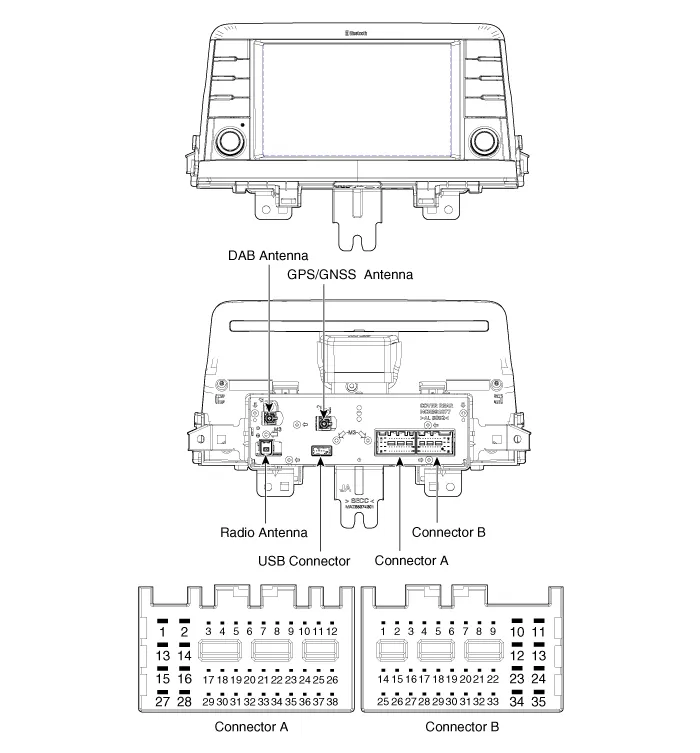
|
No.
|
Connector A
|
Connector B
|
| 1 | Rear door left speaker (+) | - |
| 2 | Rear door left speaker (-) | MIC (+) |
| 3 | - | - |
| 4 | - | - |
| 5 | - | Antenna power |
| 6 | Camera power | Illumination (+) |
| 7 | Camera video | Non E-Call type : - E-Call type : Multmedia-CAN (High) |
| 8 | - | - |
| 9 | - | ALT Left_output (-) |
| 10 | AUX Audio_right input | Battery (+) |
| 11 | AUX Detect | Battery (+) |
| 12 | Steering wheel remote controller | Ground |
| 13 | Front door left speaker (+) | Ground |
| 14 | Front door left speaker (-) | - |
| 15 | Front door right speaker (-) | MIC (-) |
| 16 | Front door right speaker (+) | - |
| 17 | - | - |
| 18 | - | - |
| 19 | - | Default : Ground Option : Illumination (-) |
| 20 | Camera power_Ground | Non E-Call type : - E-Call type : Multmedia-CAN (Low) |
| 21 | Camera video_Ground | - |
| 22 | - | ACC |
| 23 | - | - |
| 24 | AUX Audio_left input | - |
| 25 | AUX Audio_Ground | Reverse |
| 26 | Steering wheel remote controller (Ground) | Door open |
| 27 | Rear door right speaker (-) | Door unlock status |
| 28 | Rear door right speaker (+) | Parking brake |
| 29 | - | 'P' Position |
| 30 | - | Auto light |
| 31 | - | - |
| 32 | - | - |
| 33 | Camera shield_Ground | IGN1 |
| 34 | - | - |
| 35 | - | - |
| 36 | - | |
| 37 | - | |
| 38 | Vehicle speed |
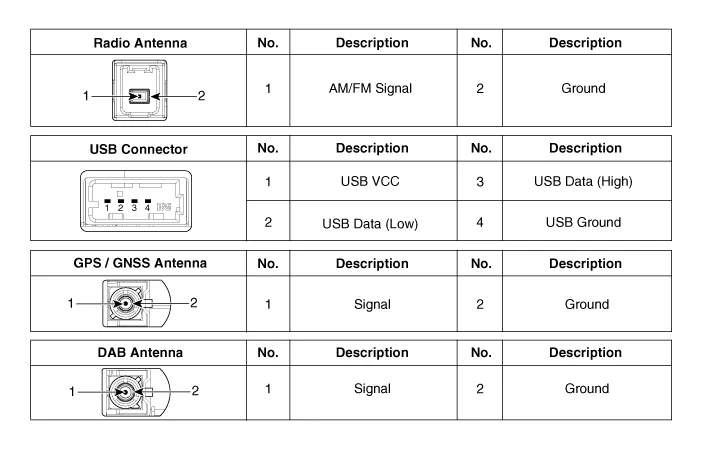
Repair procedures
| Removal |
|

| 1. | Disconnect the negative (-) battery terminal. |
| 2. | Remove the center fascia panel.
(Refer to Body - "Center Fascia Panel")
|
| 3. | Remove the AVN head unit (A) after loosening the mounting screws and nut.
|
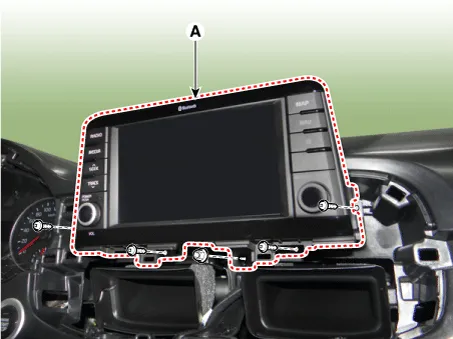
| 4. | Remove the AVN head unit after disconnecting the connectors and antenna cable (A).
|

| Installation |
| 1. | Install the AVN head unit after connecting the AVN head unit connectors and cable. |
| 2. | Install the center fascia panel. |
| 3. | Connect the negative (-) battery terminal. |
|

Components and components location Component Location 1 . AVN head unit 2. Roof antenna (Radio+GPS/GNSS+DAB+GSM) 3. Multimedia jack 4 . Steering wheel remote control (SWRC) 5 .
Repair procedures Inspection Troubleshooting of the speakers When handling the speakers :• Do not cause shock to the speakers by dropping or throwing them.
Other information:
Kia Picanto (JA) 2017-2026 Service & Repair Manual: Multimedia Jack
Schematic diagrams Circuit Diagram Description and operation Description The multimedia jack on the console upper cover is for customers who like to listen to external portable music players like the MP3 etc., through the vehicle's sound system when it is linked to this jack.
Kia Picanto (JA) 2017-2026 Service & Repair Manual: Heater Core
Repair procedures Replacement 1.Disconnect the negative (-) battery terminal. 2.Remove the heater unit. (Refer to Heater - "Heater Unit") 3.Remove the heater core cover (A) after loosening the mounting screws. 4.Pull out the heater core (A) from the heater unit.
Categories
- Manuals Home
- Kia Picanto Owners Manual
- Kia Picanto Service Manual
- Charging System
- Cylinder Head
- Fuel Delivery System
- New on site
- Most important about car
