
Kia Picanto (JA): Tire Pressure Monitoring System (TPMS) / TPMS Setting
The driver can set the TPMS by following procedures below:
1. Inflate all tires to the recommended pressure.
2. Start the engine, make sure the vehicle is not moving, and press the TPMS switch (2) left side on the driver’s seat for over 3 seconds.
3. Check if the (
 ) warning
indicator
blinks for 4 seconds.
) warning
indicator
blinks for 4 seconds.
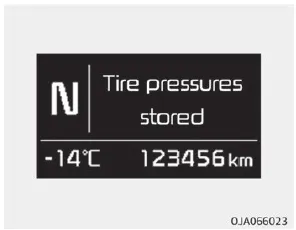
4. Check if following message appears on the cluster (if equipped).
❈ If the warning light does not blink or the message does not pop up, perform the process again from 2. For recommended tire pressure of this vehicle, refer to “Tire and wheels ” on page 9-06 or the tire pressure label on the driver’s door.
For proper function of the TPMS, the driver must set the system in following situations.
❈ Situation requiring TPMS setting
- If the tire or wheel is repaired or replaced
- If the tire or wheel is repositioned.
- If the tire pressure is adjusted.
- If the low pressure light is illuminated.
- If suspension or ABS has been replaced.
CAUTION
If the system is set without adjusting tire pressure, false alarm could occur or the telltale will not be displayed even though the vehicle is significantly under-inflated. Make sure all tires are properly adjusted to the recommended pressure when setting.
If the system is not set even in required situations, false alarm could occur or the telltale will not be displayed even though the vehicle is significantly under-inflated.
The system will not be set if you press the SET switch (2) while driving. Make sure to stop the vehicle and press the switch (2) for over 3 seconds.
• Be sure the tire is cold before inflating the pressure. A cold tire means the vehicle has been sitting for 3 hours or driven within 1.6 km (1 mile).
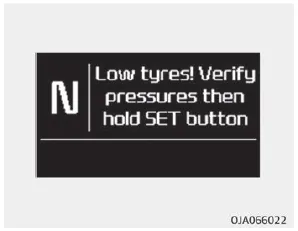
Low tire pressure telltale (1) / TPMS SET switch (2) System Overview The tire pressure monitoring system (TPMS) senses change in radius of the tire.
The ( ) warning light will illuminate when an under-inflated tire is indicated. In certain types, the above message might be displayed on the cluster.
Other information:
Kia Picanto (JA) 2017-2026 Service & Repair Manual: Hazard Lamp Switch
Repair procedures Inspection 1.Check for continuity between terminals. If the continuity is not as specified, replace the hazard lamp switch. No. Description No.
Kia Picanto (JA) 2017-2026 Service & Repair Manual: Seat Heater
Components and components location Component Location 1. Seat heater unit 2. Front seat back heater 3. Front seat cushion heater Schematic diagrams Circuit Diagram Repair procedures Inspection 1.Check for continuity and measure the resistance between terminals No 1 and No 4.
Categories
- Manuals Home
- Kia Picanto Owners Manual
- Kia Picanto Service Manual
- Normal Condition
- Heating,Ventilation, Air Conditioning
- Coolant
- New on site
- Most important about car
