
Kia Picanto (JA): Rear Parking Assist System / Parking Assist Sensor
Components and components location
| Components |

Repair procedures
| Removal |
| 1. | Disconnect the negative (-) battery terminal. |
| 2. | Remove the rear bumper assembly.
(Refer to Body - "Rear Bumper Assembly")
|
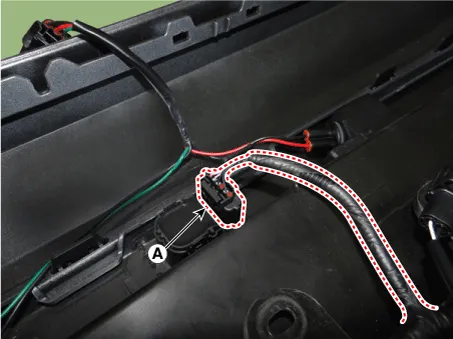
| 3. | Disconnect the connector (A) from the ultrasonic sensor.
|
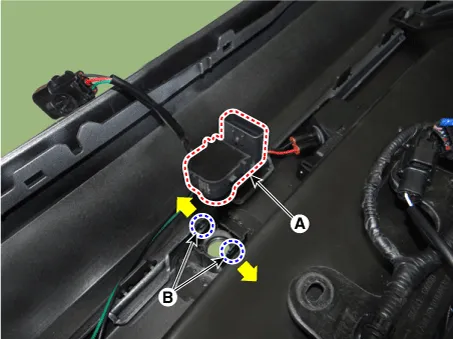
| 4. | Pull out ths ultrasonic sensor (A) by opening the sensor holder (B) out.
|
| Installation |
| 1. | Install the ultrasonic sensor and connector. |
| 2. | Install the rear bumper assembly. |
| 3. | Connect the negative (-) battery terminal. |
Specifications Specification Item Specification Ultrasonic sensor Voltage rating DC 12V Detecting range 11.
Components and components location Component Location 1 . Rear wiper arm & blade 2 . Rear wiper arm nut 3 . Rear wiper grommet 4 . Rear wiper motor assembly 5 .
Other information:
Kia Picanto (JA) 2017-2026 Service & Repair Manual: Rear Parking Assist System
Specifications Specification Item Specification Ultrasonic sensor Voltage rating DC 12V Detecting range 11.8 - 39.3 in (30 - 100 cm) Operation voltage DC 9 - 16 V Operation current 60mA Max.
Kia Picanto (JA) 2017-2026 Service & Repair Manual: Rear Wiper Motor
Repair procedures Inspection Rear Wiper Motor 1.Remove the connector from the rear wiper motor. 2.Connect positive (+) battery cables to terminal 1 and negative (-) battery cables to terminal 2 respectively. 3.Check that the motor operates normally.
Categories
- Manuals Home
- Kia Picanto Owners Manual
- Kia Picanto Service Manual
- Coolant
- Charging System
- Clutch Cable
- New on site
- Most important about car
