
Kia Picanto (JA): Lighting / Front fog light
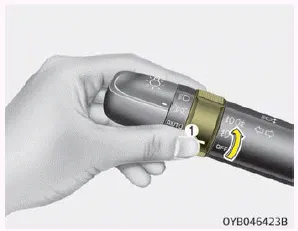
Fog lights are used to provide improved visibility when visibility is poor due to fog, rain or snow, etc. The fog lights will turn on when the fog light switch (1) is turned on after the parklight is turned on.
To turn off the fog lights, turn the fog light switch (1) to the Off position.
CAUTION
When in operation, the fog lights consume large amounts of vehicle electrical power. Only use the fog lights when visibility is poor.
The ignition switch must be on for the turn signals to function. To turn on the turn signals, move the lever up or down (A). The green arrow indicators on the instrument panel indicate which turn signal is operating.
To turn the rear fog lights on, turn the rear fog light switch (1) to the on position when the headlight is turned on. Also, the rear fog lights turn on when the rear fog light switch is turned on after the front fog light switch (if equipped) is turned on and the headlight switch is in the parklight position.
Other information:
Kia Picanto (JA) 2017-2026 Service & Repair Manual: Fuses And Relays
C
Kia Picanto (JA) 2017-2026 Service & Repair Manual: Headlamp Leveling Actuator
Components and components location Components Repair procedures Removal 1.Disconnect the negative (-) battery terminal. 2.Remove the headlamp assembly. (Refer to Lighting System - "Headlamps") Installation 1.Install the headlamp assembly.
Categories
- Manuals Home
- Kia Picanto Owners Manual
- Kia Picanto Service Manual
- Fuel Delivery System
- Engine Oil and Filter
- Heating,Ventilation, Air Conditioning
- New on site
- Most important about car
