
Kia Picanto (JA): Seat Electrical / Seat Heater Switch
Components and components location
| Components |
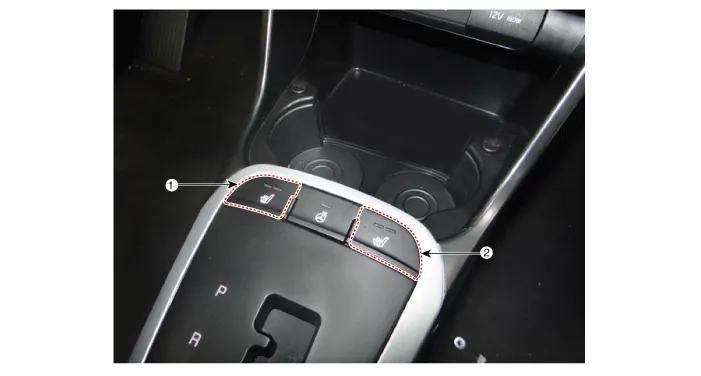
| 1. Driver side seat heater switch | 2. Passenger side seat heater switch |
Schematic diagrams
| Circuit Diagram |
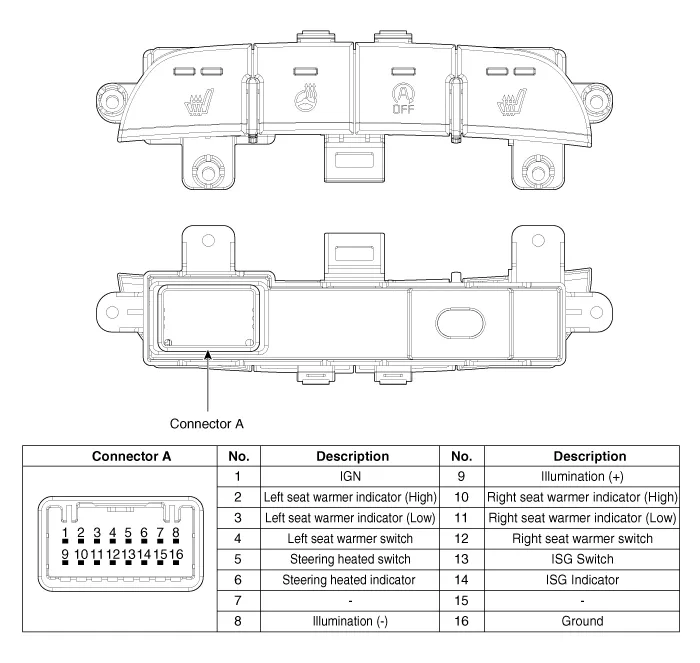
Repair procedures
| Removal |
| 1. | Disconnect the negative (-) battery terminal. |
| 2. | To remove the gear knob & gear boots (A) pull both of it up.
|

| 3. | Using a remover, remove the console indicator cover assembly (A).
|
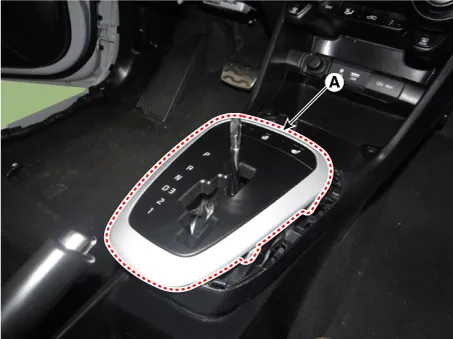
| 4. | Disconnect the connector (A) from the console indicator cover assembly.
|

| 5. | Remove the console upper cover switch (A) after loosening the mounting screws.
|

| Installation |
| 1. | Install the console upper cover switch. |
| 2. | Connect the console indicator cover assembly connector. |
| 3. | Install the console indicator cover assembly. |
| 4. | Install the gear knob & gear boots. |
| 5. | Connect the negative (-) battery terminal. |
Components and components location Component Location 1. Seat heater unit 2. Front seat back heater 3. Front seat cushion heater Schematic diagrams Circuit Diagram Repair procedures Inspection 1.
Specifications Specifications Smart Key Unit Items Specification Rated voltage DC 12 V Operating voltage DC 9 - 16 V Operating temperature -31 - 167°F (-35 - 75°C) Load Max.
Other information:
Kia Picanto (JA) 2017-2026 Service & Repair Manual: Power Windows
Components and components location Component Location 1. Driver power window switch 2. Assist power window switch 3. Rear power window switch 4. Front window motor 5. Rear window motor Description and operation Safety Function of Power Window When driver door power window auto-up switch is operated, safety function is acti
Kia Picanto (JA) 2017-2026 Service & Repair Manual: Climate Control Air Filtar
Description and operation Description This has particle filter which eliminates foreign materials and odor. The particle filter includes odor filter as well as conventional dust filter to ensure comfortable interior environment. Repair procedures Replacement 1.
Categories
- Manuals Home
- Kia Picanto Owners Manual
- Kia Picanto Service Manual
- Front Disc Brake
- Maintenance
- Engine Oil and Filter
- New on site
- Most important about car
