
Kia Picanto (JA): AVN System / Multimedia Jack
Schematic diagrams
| Circuit Diagram |
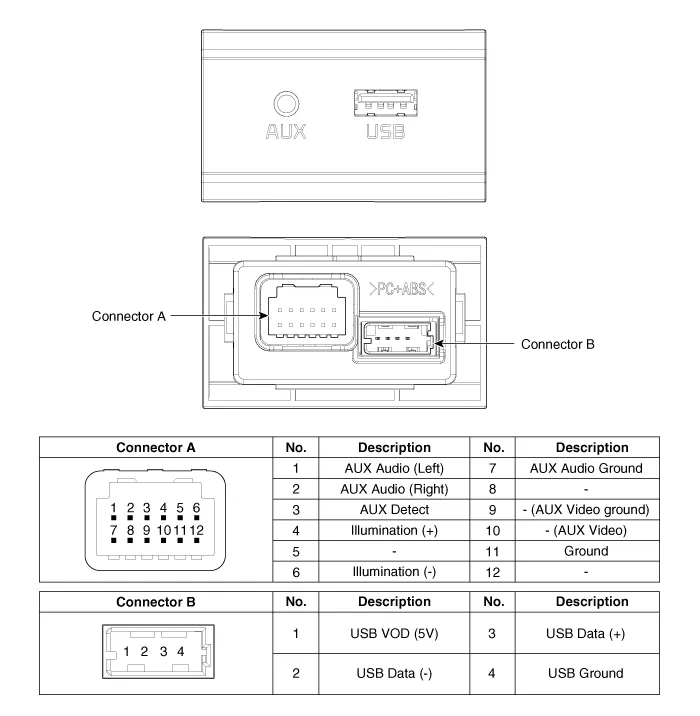
Description and operation
| Description |

Repair procedures
| Removal |
Put on gloves to protect your hands. |

|

| 1. | Disconnect the negative (-) battery terminal. |
| 2. | Using a screwdriver or remover, remove the floor console front bezel (A).
|

| 3. | Disconnect the connectors (A) from floor console front bezel.
|
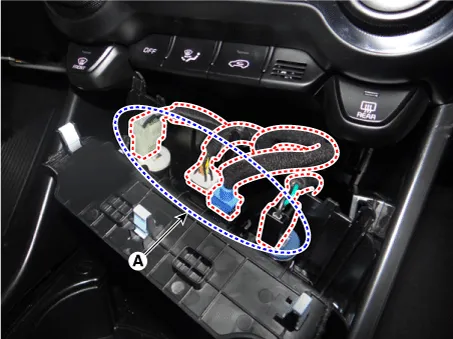
| 4. | Remove the multimedia jack (A) after releasing the fixed hooks.
|


| Installation |
| 1. | Install the multimedia jack. |
| 2. | Connect the connectors from the floor console front bezel. |
| 3. | Install the floor console front bezel. |
| 4. | Connect the negative (-) battery terminal.
|
Components and components location Components 1. Left Remote Control Switch (Audio + Hands free + Voice) 2. Right Remote Control Switch (Cruise+Trip Computer) Schematic diagrams Circuit Diagram [Audio] [Audio + Bluetooth] [Audio + Bluetooth + Voice] [Trip (2 Button) + SEG LCD Cluster] [Trip (2 Button) + ACC] [Trip (2 Button) + ACC + SLD] [Trip (4 Button) + DOT&TFT LCD Cluster] [Trip (4 Button) + ACC] [Trip (4 Button) + ACC + SLD] Repair procedures Removal 1.
Repair procedures Inspection 1.Disconnect the negative (-) battery terminal. 2.Remove the roof trim assembly. (Refer to Body - "Roof Trim Assembly") 3.
Other information:
Kia Picanto (JA) 2017-2026 Service & Repair Manual: Power Door Lock Switch
Repair procedures Inspection 1.Check for continuity between the terminals. If there is an abnormality, replace the switch. Removal • When removing with a flat-tip screwdriver or remover, wrap protective tape around the tools to prevent damage to components.
Kia Picanto (JA) 2017-2026 Service & Repair Manual: Smart Key Diagnostic
Repair procedures Inspection Self Diagnosis With Scan Tool It will be able to diagnose defects of SMART KEY system with KDS/GDS quickly. KDS/GDS can operates actuator forcefully, input/output value monitoring and self diagnosis. The following three features will be major problem in SMART KEY system.
Categories
- Manuals Home
- Kia Picanto Owners Manual
- Kia Picanto Service Manual
- Engine Control / Fuel System
- Key positions
- Engine Oil and Filter
- New on site
- Most important about car
