
Kia Picanto (JA): Lighting System / License Lamps
Repair procedures
| Removal |
| 1. | Disconnect the negative (-) battery terminal. |
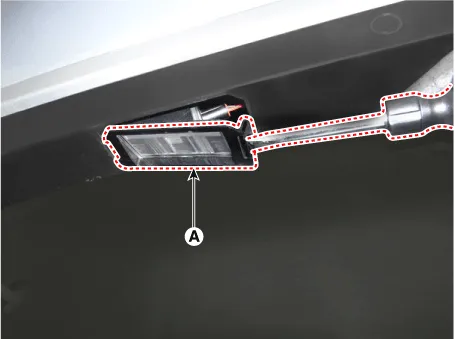
| 2. | Remove the license lamp assembly (A) after pressing the locking pin.
|
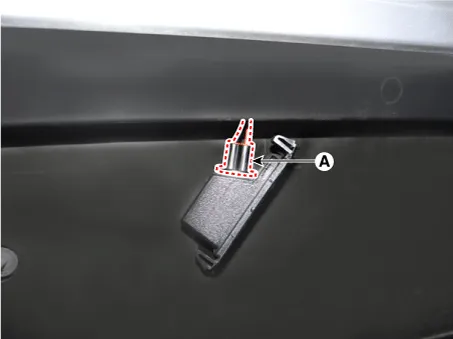
| 3. | Disconnect the license lamp connector (A).
|
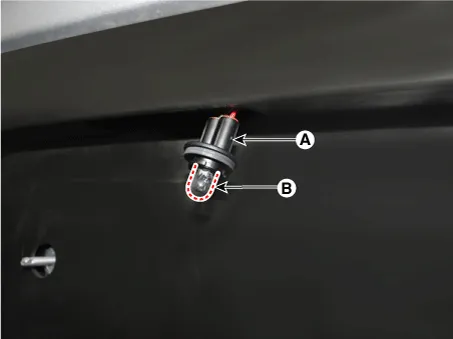
| 4. | Remove the license lamp bulb (B) after removing the license lamp socket (A).
|
| Installation |
| 1. | Install the license lamp bulb. |
| 2. | Connect the license lamp connector. |
| 3. | Install the license lamp assembly. |
| 4. | Connect the negative (-) battery terminal. |
Repair procedures Removal 1.Disconnect the negative (-) battery terminal. 2.Remove the front bumper assembly. (Refer to Body - "Front Bumper Assembly") 3.
Repair procedures Removal 1. Disconnect the negative (-) battery terminal. 2. Open the tailgate. 3. Loosen the high mounted stop lamp mounting nuts (A).
Other information:
Kia Picanto (JA) 2017-2026 Service & Repair Manual: Blower Motor
Repair procedures Inspection 1. Connect the battery voltage and check the blower motor rotation. 2. If the blower motor voltage is not operated well, substitute with a known-good blower motor and check for proper operation. 3. If the problem is corrected, replace the blower motor.
Kia Picanto (JA) 2017-2026 Service & Repair Manual: Climate Control Air Filtar
Description and operation Description This has particle filter which eliminates foreign materials and odor. The particle filter includes odor filter as well as conventional dust filter to ensure comfortable interior environment. Repair procedures Replacement 1.
Categories
- Manuals Home
- Kia Picanto Owners Manual
- Kia Picanto Service Manual
- Suspension System
- Engine Oil and Filter
- Timing Chain
- New on site
- Most important about car
