
Kia Picanto (JA): Steering wheel / Horn
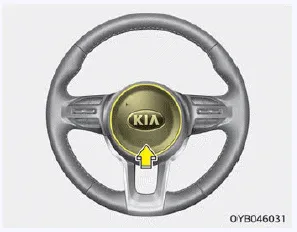
To sound the horn, press the horn symbols on your steering wheel. Check the horn regularly to be sure it operates properly.
NOTICE
To sound the horn, press the area indicated by the horn symbol on your steering wheel (see illustration). The horn will operate only when this area is pressed.
CAUTION
Do not strike the horn severely to operate it, or hit it with your fist. Do not press on the horn with a sharppointed object.
When the ignition switch is in the ON position, pressing the heated steering wheel button warms the steering wheel. The indicator on the button will illuminate.
Inside rearview mirror Adjust the rearview mirror to center on the view through the rear window. Make this adjustment before you start driving. WARNING Rear visibility Do not place objects in the rear seat or cargo area which would interfere with your vision through the rear window.
Other information:
Kia Picanto (JA) 2017-2026 Service & Repair Manual: Headlamp Leveling Actuator
Components and components location Components Repair procedures Removal 1.Disconnect the negative (-) battery terminal. 2.Remove the headlamp assembly. (Refer to Lighting System - "Headlamps") Installation 1.Install the headlamp assembly.
Kia Picanto (JA) 2017-2026 Service & Repair Manual: Power Window Motor
Components and components location Components [Standard Window Motor] [Safety Window Motor] Repair procedures Inspection • When removing with a flat-tip screwdriver or remover, wrap protective tape around the tools to prevent damage to components.
Categories
- Manuals Home
- Kia Picanto Owners Manual
- Kia Picanto Service Manual
- Normal Condition
- Body Electrical System
- Engine And Transaxle Assembly
- New on site
- Most important about car
