
Kia Picanto (JA): LCD windows / Automatic reset (for type B cluster)
To make the average fuel economy be reset automatically whenever refueling, select the “Fuel economy auto reset” mode in User Setting menu of the LCD Windows (Refer to “LCD Windows” on page 4-50).
- OFF - You may set to default manually by using the trip switch reset button.
- When driving - The vehicle will automatically set to default once 4 hours pass after the Ignition is in OFF.
- When refueling - After refueling more than 6 liters and driving over 1km/h, the vehicle will reset to default automatically.
NOTICE
The average fuel economy is not displayed for more accurate calculation if the vehicle does not drive more than 10 seconds or 50 meters
(0.03 miles)
since the ignition switch or Engine Start/Stop button is turned to ON.
Instant Fuel Economy
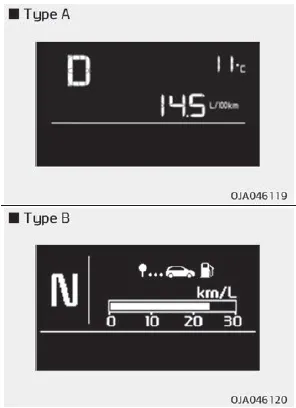
- This mode displays the instant fuel economy during the last few seconds when the vehicle speed is more than 10 km/h (6.2 MPH).
- For Type A cluster : 0 ~ 99.9 km/L, L/100 km, MPG
- For Type B cluster : 0 ~ 30 km/L, L/100km, 0 ~ 50 MPG
The trip computer is a microcomputercontrolled driver information system that displays information related to driving. NOTICE Some driving information stored in the trip computer (for example Average Vehicle Speed) resets if the battery is disconnected.
1. Trip Computer mode This mode displays driving information like the tripmeter, fuel economy, and so on. For more details, refer to “Trip Computer” on page 4-50.
Other information:
Kia Picanto (JA) 2017-2026 Service & Repair Manual: Parking Assist Sensor
Components and components location Components Repair procedures Removal 1.Disconnect the negative (-) battery terminal. 2.Remove the rear bumper assembly. (Refer to Body - "Rear Bumper Assembly") 3.Disconnect the connector (A) from the ultrasonic sensor.
Kia Picanto (JA) 2017-2026 Service & Repair Manual: Smart Key System
Specifications Specifications Smart Key Unit Items Specification Rated voltage DC 12 V Operating voltage DC 9 - 16 V Operating temperature -31 - 167°F (-35 - 75°C) Load Max. 4mA (When welcome light function "OFF") RF Receiver Items
Categories
- Manuals Home
- Kia Picanto Owners Manual
- Kia Picanto Service Manual
- Normal Condition
- Cylinder Head
- Automatic Transaxle Fluid
- New on site
- Most important about car
